Gaming at a PC level often means diving into a world full of intricate systems, performance tweaks, and hidden features. Whether you’re a casual gamer or a seasoned pro, there’s always something new to discover. Here are some hidden tricks that could enhance your gameplay experience significantly.
1. Optimize Your Graphics Settings
Most gamers are aware of the default graphic settings, but customizing them can lead to a smoother experience. Dive into the settings menu and look for options like texture quality, shadows, and anti-aliasing. Reducing shadow detail or turning off motion blur can free up resources, leading to higher frame rates. Using tools like NVIDIA GeForce Experience or AMD Radeon Software, you can automatically optimize these settings based on your hardware, giving you a solid foundation to build on.
2. Utilize Game Mode in Windows 10 and 11
Windows 10 and 11 come with a “Game Mode” feature that prioritizes gaming performance by allocating more resources to your game and limiting background processes. To enable it, simply go to Settings > Gaming > Game Mode. This setting helps reduce lag and frame drops, especially when you have other applications running in the background. Make sure to check your performance before and after enabling it to see the difference.
3. Use Steam’s Big Picture Mode
If you haven’t explored Steam’s Big Picture Mode, you’re missing out on a user-friendly interface designed for a console-like experience. Not only does it allow you to navigate your game library easily, but it also offers various controller configurations and cloud saves. Plus, you can create custom game libraries or playlists, making it simpler to access your frequently played titles.
4. Customize Your Keyboard Shortcuts
Did you know you could customize keyboard shortcuts in most games? This may seem minor, but finding a key configuration that works for you can drastically improve your reaction time and overall performance. Many games allow you to rebind keys in the settings, letting you set up commands that feel more intuitive to your style. For instance, moving crucial abilities or items closer to where your fingers normally rest can take your gameplay to the next level.
5. Use Overlay Tools
Tools like Razer Cortex, MSI Afterburner, or GeForce Overlay provide real-time statistics on your system’s performance, including frame rates, CPU usage, and VRAM consumption. Monitoring these metrics can help you identify performance bottlenecks. You can also record gameplay, capture screenshots, and stream live without needing to switch away from your game, adding depth to your gaming experience.
6. Adjust Your DPI Settings
Mouse sensitivity can significantly impact your gameplay, especially in fps games. Most gaming mice allow you to adjust DPI settings, which dictates how responsive your cursor is to movement. Often, esports pros use lower DPI settings for greater accuracy. Experimenting with different DPI levels can help you find a setting that suits your playstyle, providing pinpoint accuracy when it matters the most.
7. Use Discord for In-Game Communication
While many games come with built-in voice chat, using a dedicated platform like Discord can enhance your communication. Discord offers better audio quality, customizable channels, and additional features like screen sharing. Joining a community through Discord also opens doors to finding other gamers with similar interests, helping you build a team or meet new friends for co-op adventures.
8. Explore Mods and Custom Content
If you’re playing single-player games, consider exploring mods that enhance your experience. Platforms like Nexus Mods and Steam Workshop provide countless mods that can improve everything from graphics to gameplay mechanics. Modding can breathe new life into titles, change the game entirely, or even fix bugs that developers haven’t addressed yet. Just be wary of compatibility issues and always back up your game before adding mods.
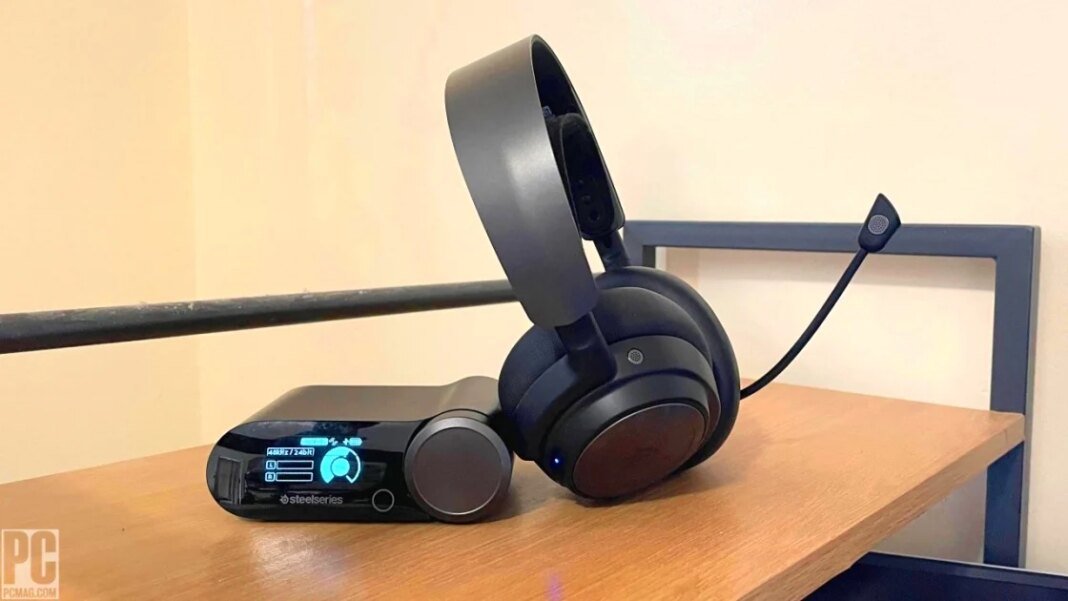
9. Invest in a Good Headset
Sound is often overlooked in gaming, yet it can provide crucial information that enhances your overall experience. Having a good headset enables you to hear subtle cues—like footsteps or environmental sounds—that can give you an advantage in competitive gaming. Look for headsets with surround sound capabilities to enhance your immersion and situational awareness.
10. Manage Background Applications
Before launching your game, check what apps are running in the background. Applications like web browsers, media players, or even software update services can consume system resources, leading to performance drops. Use the Task Manager to close unnecessary applications, ensuring that your game has as much power as possible. Some gamers even create customized profiles that disable certain applications when launching specific games.
11. Overclock Your GPU (with Caution)
If you’re comfortable with tech, overclocking your GPU can yield performance gains, allowing you to squeeze every bit of power from your hardware. Tools like MSI Afterburner let you adjust clock speeds and voltages. However, overclocking does come with risks, including overheating and potentially voiding your warranty. Always monitor your temperatures and performance while doing this, and consider starting with small increments to avoid issues.
12. Use the Right Resolution and Refresh Rate
Most modern monitors support various resolutions and refresh rates. Matching your in-game resolution with your display and maximizing refresh rates can significantly enhance your gaming experience. Higher refresh rates provide smoother gameplay, while the right resolution ensures sharp images. To check and adjust these settings, head to the Display Settings in Windows or the in-game options menu for optimal visual quality.
By integrating these hidden tricks into your gaming routine, you can unlock a new level of engagement and performance that not only optimizes your gameplay but makes your overall experience more enjoyable. Happy gaming!